
If you go on over to Coderbyte.com there is a free programming challenge called Pentagonal Number that asks you to calculate the number of dots in a pentagon based on some pattern of growth.
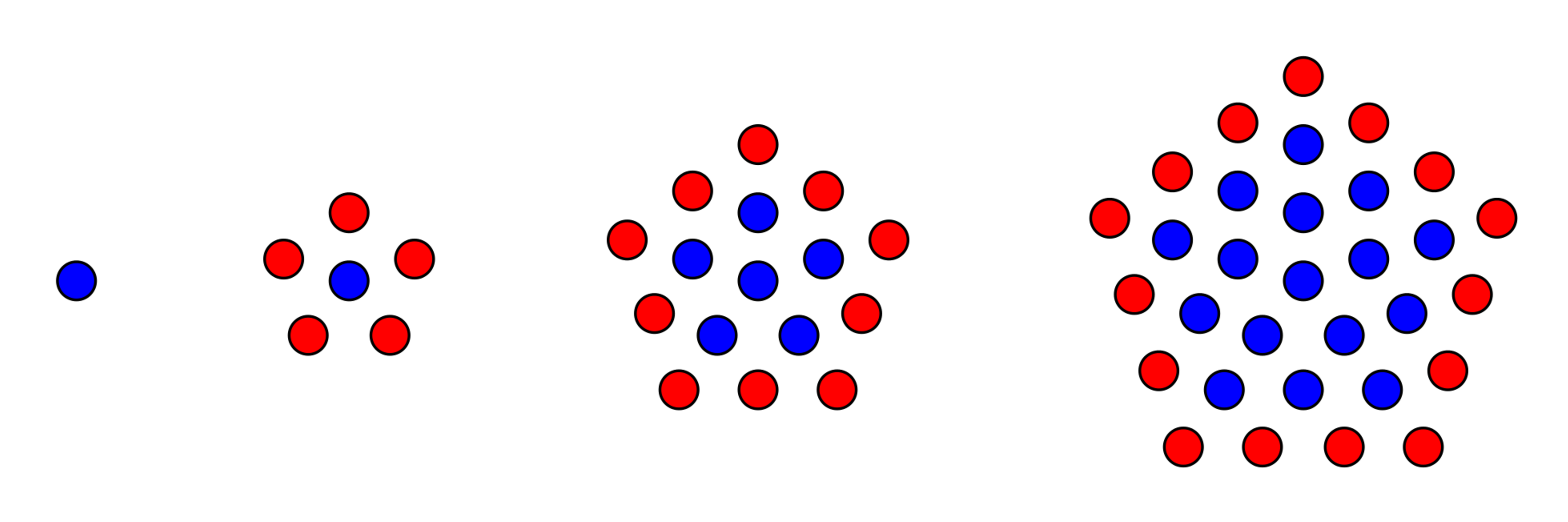
The idea is to write a program that takes some number as input and returns the amount of dots that would appear in that number’s iteration of whatever pattern is going on here. It’s not hard to figure out that the pattern is the iteration number, multiplied by 5, added to the number of dots in the previous iteration.
int dots = 1;
for(int  iteration=0; iteration<input; iteration++ ){
  dots = dots + iteration*5;
}
I think this pretty much sums up the solution in a C-like language. Very easy. But it is important to check that it works. The input should always be greater than 0, since I’m not sure what a zero’th pentagon would be. Thus, an input of 1 would return a “pentagon” of 1 dot. An input of 2 would return a pentagon of size 6. And input of 3 would return a pentagon of size 16; etc.
However, there is one thing that is annoying about this loop. If the input is 1, the solution should also be 1. Thus, if dots initializes at 1, then the loop doesn’t need to run at all. But it does, it runs at least once, and thus does a useless calculation. It multiplies 5 by 0 and then adds it to 1, resulting in 1. This is fixed by initializing iteration to 1.
int dots = 1;
for(int iteration=1; iteration<input; iteration++ ){
  dots = dots + iteration*5;
}
But how could we write this in Assembly? First, I’d want to think about this in terms of how many operations are going on, how many variables I am using, and the nature of the loop that I want to use. First, let me try to count out all of the fundamental instructions that are going on here.
1. INIT dots
2. INIT iteration
3. INIT or LOAD input
4. MULTIPLY iteration by 5
5. ADD the results to dots
6. INCREMENT iteration
7. COMPARE iteration with input
8. BRANCH if lower
It looks like I will need up to 3 instructions to initialize or load my variables (w/ each one likely requiring its own register)… plus 3 arithmetic instructions for the calculation… plus 2 conditional instructions to make the loop. Generally in AVR Assembly, condition structures will be made out of two instructions. First, a Compare instruction that sets the Status Register based on the results of subtracting two values. And then a Conditional Branch which either jumps or doesn’t to a location based on information inferred about the results of the Compare operation by reading the Status Register. I guess just to jump right into it, it would look something like this in basic AVR Assembly…
.def five      = r16 .def dots  = r17
.def iteration = r18 .def limit = r19

//imagine input is some address in memory or i/o where we might //receive an arbitrary input the the pentagon problem

LDI five,5                 //load 5 immediately into reg five
LDI dots,1		   //load 1 immediately into reg dots
LDI iteration,1	           //load 1 immediately into reg iteration
LDS limit,input            //load input from dspace into reg limit
RJMP condition             //jump to condition
for_loop:
    MUL iteration,five
    ADD dots,product
    inc iteration
condition:
    CP iteration,limit     //compare iteration w/ limit and branch to
    BRLO for_loop          //for_loop if iteration lower than limit
You’ll be happy to learn that most AVR devices have a MULtiply instruction. Unfortunately, it doesn’t take Immediate Values, it only multiplies registers. Thus, I need to have an extra initialization step where I immediately load a 5 into a register that I named “five”. Because I can infact name registers in AVR Assembly IDE’s, which is amazing because it actually makes Assembly tolerable. This is done with the .def and .undef directives, which can be placed anywhere.
AVR Assembler is incredibly flexible when it comes to formatting. Most of the time you can place multiple directives and instructions on the same line, and it knows exactly how to interpret it. I like to define two registers per line because it takes up less lines and is prettier. Part of keeping your sanity with Assembler is finding aesthetic.
.def five      = r16 .def dots  = r17
.def iteration = r18 .def limit = r19
LDS is a neat little instruction that makes life easy. It stands for LoaD from Space; or more specifically LoaD Direct from Data Space. It will accept a 16bit address and load a byte from that address into a register. This completely bypasses the need for using a Pointer to load from Data Space. Naturally, the cost is a double sized instruction and a clock or two more to execute than the more common Indirectly Loading( LD r16, X ). Using a pointer to load from Data Space is usually called Indirect Loading. It is important to not confuse that with Immediately Loading, because of the common use of “I”. I did NOT load “five”, “dots”, and “iteration” Indirectly, I loaded them IMMEDIATELY.
Please check my templating post if you want more information, but… essentially, because I am only simulating this problem and not running it on an actual device, I am not taking real world input, say from an I/O pin or a peripheral module, so I have to make up my own input and program it in. This could be done easily by Immediately Loading(LDI) whatever number I want to test into a register. However, that would be hardcoding the problem to calculate based ONLY on the number I programmed; making it a one shot program, I would have to re-assemble each time I want to calculate a new number. By writing the program to operate based on a value we read from memory, we can imagine that on a running device that memory value could change, thus the program is an actual function, not just a math problem.
So anyway… in this case the “input” is actually a label for a 16bit Data Space(RAM) address, where I might expect to load the input for this Pentagon Problem. Because if you can still remember, that’s what we are trying to do. That’s enough about initialization for now.
RJMP condition
for_loop:
    MUL iteration,five
    ADD dots,product
    inc iteration
condition:
    CP iteration,limit
    BRLO for_loop
This Loop Structure is very important. It is the Assembly equivalent of a While Loop. Technically, the condition could be placed at the top, like in other languages, but I have come to much prefer this style, it usually requires one less label. No matter how it is structured, you can’t avoid having to have a jump instruction; it is required to make sure the body and condition execute in the correct order. Please see my post on Conditional Loops for more information. RJMP is usually one clock cheaper than JMP, so it is usually preferred; read the instruction manual for why. CP compares two registers by virtually subtracting “limit” from “iteration” to measure which one is larger or smaller than the other. BRLO stands for BRanch if Lower, which turns out to be distinct from BRanch if Less Than(BRLT), because BRLO is intended for unsigned comparisons, and BRLT is intended for signed comparisons. I am not using signed numbers.
You will notice, that in addition to “input”, there is one other label/definition here that was not initialized, “product”. The MUL instruction multiplies 2 unsigned numbers, which must be in registers(which was the reason I need an extra “five” register), and is hardcoded to place the result in Register0 and Register1. The MUL instruction anticipates that the result could be as large as 16bits; however, right now I only care about making my program work for 8bits, and then I will scale up. Long story short, I defined “product” to refer to Register0
.def product = r0

MUL iteration,five
ADD dots,product
I then ADD the “product” of the MULtiplication to the register “dots”, which I am using to accumulate the solution on each iteration, because the solution of each iteration depends on the solution of the last one.
That’s it! Granted you know how to store a test value in memory using .DB and .BYTE, you should be able to run this, or at least recreate it. If you need to know how to use .DB and .BYTE please check my templating post. Eventually, however given the 8 bit nature, this program will break for input above a given input because one of my registers will inevitably overflow; probably “product” or “dots”. In PART II, I will try to maximize the amount of input this program can tolerate by identifying which registers are overflowing and expand them to handle 16bit numbers….
 AVR ASSEMBLY HOME